.png)

Easy Time Entry
Enter time by clicking on a cell to open the time record
Add optional notes, submit time daily or at the end of the time period
Easily see time approvals, rejections and modifications in real time
Changes to time records require a reason to meet DCAA compliance

Approve Time Quickly
Select Time Users from Summary View for quick approvals
Once approved, time cannot be changed unless unapproved by Time Approver

Approve Time with Daily View
Switch to Daily View to see time charges by Time User by day

Approve Time with Detail View
Switch to Detail View to see individual time records by time entry cell

View Timesheet during Approvals
Click on View button to open a Time User's timesheet during approvals

View Time User's Timesheet
Navigate to Enter Time and select the Time User
You will be able to view the Time User's timesheet as they see it

Modify a Time User's Timesheet
Navigate to Enter Time and select the Time User
Select the time record or empty cell to if you have been assigned this permission
A reason for change is required and Time User will not be able to edit
This action will be recorded in the Audit Trail for DCAA compliance

Use Filters and Save as Views
Easily review and approve a large workforce with powerful filters
Save filters as Views to be used again in the future

Multi-level Approvals
Quickly establish teams with multiple approvers
Change team membership and leaders in real time

Project Leader Approvals
As an option, require project leaders to approve project time
Automatically route approvals to project leaders for their review and sign-off
Project leaders only see time entries related to their assigned projects

Reject Submitted Time
Time Approver and Project Leader can reject individual time records
Rejections can be made in batch mode by filtering time records
Time User is notified automatically of the rejected time

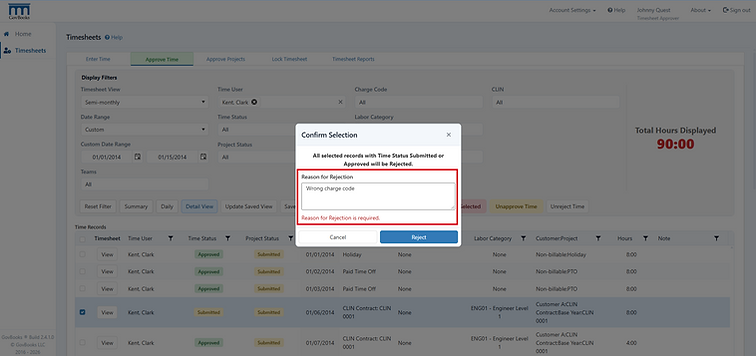
Reason for Rejected Time
Time Approver and Project Leader required to provide a reason for the rejection
Correcting Rejected Time
Time User opens rejected time record to make the correction
Time User may change the hours or delete the time record
The reason for rejection from the Time Approver appears on the time record
After correction, Time User resubmits time record for approval

Customized Charge Codes
Each charge code can have their own customized features
Decide whether to use CLINs, labor categories, date ranges, future charging
Set billing status, enter revenue, cost or hour budgets
Connect to QuickBooks Online customers, sub-customers, projects and classes

Charge Code Assignments
Control which charge codes appear on an Time User's timesheet
Prevent charging time to unauthorized charge codes

CLINs
Set up optional CLINs if required by your contract
Add CLINs to charge codes and timesheets
Connect CLINs to QuickBooks Online Service Items for billing

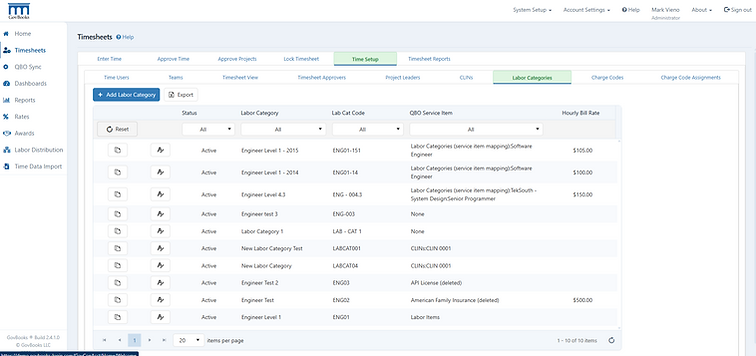
Labor Categories
Set up optional Labor Categories if required by your contract
Add Labor Categories to charge codes and timesheets
Connect Labor Categories to QuickBooks Online Service Items for billing
Enter the hourly billing rate for invoicing
Manage Time Users
Set up Time Users and manage time subscriptions
Set up Login Accounts and send invitations
Assign Timesheet Roles, Teams, Timesheet View
Assign permissions for Timesheet Approvers

Timesheet Views
Create unlimited number of Timesheet Views
Assign weekly, biweekly, semi-monthly or monthly time periods to a Timesheet View
Assign Time Users to Timesheet Views to allow different time periods to be used

Lock Timesheets
Lock the timesheet of Time Users to prevent unwanted changes
Filter by Time User or Charge Code
Select a date range as required
Timesheets Only
5$Every monthAccess to timesheet module only.30 day free trial- $5 per timesheet user per month
- Direct integration with QuickBooks Online
- Cancel anytime, no long-term contract
- 30 day free trial
- $5 per month minimum
GovBooks Pro
100$Every monthMonthly subscription that integrates with QuickBooks Online30 day free trial- Includes all timesheet features +
- Indirect rates, labor distribution, and funding
- Cancel anytime, no long-term contract
- 30 day free trial
- 20 timesheet users included, then $5 for each additional